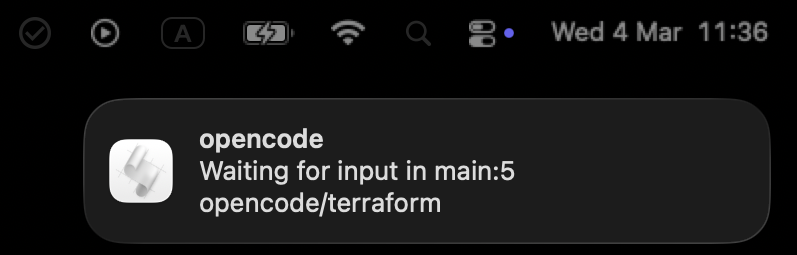
I keep several OpenCode sessions running, one per tmux window. When one goes idle I know something finished, but not which window wants me, and a sound for every event (PeonPing does that, and does it well) pulled my attention away from whatever I was doing meanwhile. So I wrote a small OpenCode plugin: a marker in the tmux window list on the exact window that is waiting, and a macOS notification only when the terminal is not in front.
The result

How the plugin decides
OpenCode plugins are TypeScript modules
in ~/.config/opencode/plugins/, run by Bun. A plugin exports an async
function that returns handlers: one generic event handler plus named hooks
for a few events; the shell commands below use Bun’s $. Everything this
plugin does is a mapping from events to two states, the marker on the window
and whether to notify:
| Event | Meaning | Effect |
|---|---|---|
session.idle | the agent finished and waits for me | marker on; notify unless the terminal is in front |
permission.ask, permission.updated | the agent needs an approval | marker on |
session.status with busy | the agent is working again | marker off |
chat.message | I typed something | marker off |
Permission prompts mark the window without a notification because they come in bursts while I am usually already looking. The shape of the file:
import { $ } from "bun";import type { Plugin } from "@opencode-ai/plugin";
const TITLE = "OpenCode";const OPTION = "@opencode_waiting";const MARK = "●";const TERMINAL = /alacritty/i;
export const TmuxWindowNotification: Plugin = async () => {  const pane = (await $`printenv TMUX_PANE`.text()).trim() || null;  const windowId = pane ? await tmuxQuery(pane, "#{window_id}") : null;
  return {    event: async ({ event }) => { /* ... below ... */ },    "permission.ask": async () => setWaiting(windowId, true),    "chat.message": async () => setWaiting(windowId, false),  };};
Pinning the window
TMUX_PANE is the pane OpenCode was started in, and the plugin resolves it to
a window id once, at load. Without that, an event would be attributed to
whichever window happens to be active when it fires, which is the one window
that does not need a marker:
const tmuxQuery = async (target: string, format: string) => {  const args = ["display-message", "-p", "-t", target, format];  return (await $`tmux ${args}`.text()).trim();};
// "work:3 api": session, window index and name for the notificationconst windowLabel = (pane: string) =>  tmuxQuery(pane, "#S:#I #{window_name}");
The marker
The marker is a tmux window option, set or unset on the pinned window; the status line draws it, and tmux clears it when the window is selected. The plugin remembers the last state so that a burst of events sends one command, not one per event:
let waitingState: boolean | null = null;
const setWaiting = async (  windowId: string | null,  waiting: boolean,) => {  if (!windowId || waitingState === waiting) return;  const args = waiting    ? ["-q", "-t", windowId, OPTION, MARK]    : ["-q", "-u", "-t", windowId, OPTION];  try {    await $`tmux set-window-option ${args}`;    waitingState = waiting;  } catch {    // tmux is gone or the window is; nothing to mark  }};
The notification
macOS notifications go through osascript. The frontmost application is
checked first, so a session that finishes while the terminal is already in
front produces a marker and no popup:
const FRONTMOST = [  'tell application "System Events"',  "to get name of first application process whose frontmost is true",].join(" ");
const terminalInFront = async () => {  try {    const name = (await $`osascript -e ${FRONTMOST}`.text()).trim();    return TERMINAL.test(name);  } catch {    return false;  }};
const notify = async (message: string) => {  const script = [    "on run argv",    "set {msg, ttl} to argv",    'display notification msg with title ttl sound name "Pop"',    "end run",  ];  const flags = script.flatMap((line) => ["-e", line]);  await $`osascript ${flags} ${message} ${TITLE}`;};
The event handler
The generic handler carries the mapping from the table. session.status
arrives with a status that is a string in some events and an object in
others, hence the unwrapping:
event: async ({ event }) => {  if (event.type === "session.status") {    const status = event.properties?.status;    const type = typeof status === "object" ? status?.type : status;    if (type === "busy") await setWaiting(windowId, false);    return;  }
  if (event.type === "permission.updated") {    await setWaiting(windowId, true);    return;  }
  if (event.type !== "session.idle") return;
  await setWaiting(windowId, true);  if (await terminalInFront()) return;
  const label = pane ? await windowLabel(pane) : null;  await notify(    label ? `Waiting for input in ${label}` : "Waiting for your input",  );},
The tmux side
The status line shows the marker when the option is set, and three hooks clear it when the window is selected or the client regains focus:
# the marker, drawn before the window index while the option is setset -g @waiting '#{?@opencode_waiting,#[fg=colour153]● ,}'setw -g window-status-current-format ' #{E:@waiting}#I:#W#F 'setw -g window-status-format ' #{E:@waiting}#I:#W#F '
# clear it when the window is selected or the terminal regains focusset-hook -g after-select-window 'setw -qu @opencode_waiting'set-hook -g session-window-changed 'setw -qu @opencode_waiting'set-hook -g client-focus-in 'setw -qu @opencode_waiting'
#{E:@waiting} expands the option’s value as a format, so the conditional
lives in one place and the two window formats only reference it.
Limitations
Everything about the notification is macOS: osascript for the popup and
for the frontmost check. On Linux the same two calls would be notify-send
and a compositor-specific query.
The terminal is a regular expression on the frontmost application’s name,
so a different terminal means editing TERMINAL.
TMUX_PANE has to be in OpenCode’s environment, which it is when OpenCode
is started from inside tmux. Started elsewhere, the plugin still notifies,
with the generic text, and marks nothing.
The marker belongs to a window, not a session. Two OpenCode sessions in one window share it, and selecting the window clears it for both.
Comments