# OpenCode + tmux notifications for idle agents
> A small OpenCode plugin marks the tmux window whose agent is waiting for input, and sends a macOS notification only when the terminal is not in front.
Engineering note by Oleksandr Ponomarov · 04 March 2026 · Topics: opencode, tmux, devex
Canonical: https://oponomarov.com/blog/posts/opencode-tmux-notifications/
I keep several [OpenCode](https://opencode.ai) sessions running, one per
[tmux](https://github.com/tmux/tmux) window. When one goes idle I know
something finished, but not which window wants me. A sound for every event
([PeonPing](https://www.peonping.com) does that, and does it well) pulled my
attention away from whatever I was doing. So I wrote a small OpenCode plugin.
It puts a marker in the tmux window list on the exact window that is waiting,
and sends a macOS notification only when the terminal is not in front.
> [!NOTE] Versions
>
> OpenCode’s plugin API as of March 2026, tmux and
> [Alacritty](https://alacritty.org) on macOS. The complete plugin and the
> `tmux.conf` snippet are in
> [this gist](https://gist.github.com/shmileee/f8b9d0e380a53055e14fe6403c86e2cf);
> the listings below are condensed from it.
## The result
The tmux window list, with a ● before the one window whose agent is waiting for input.
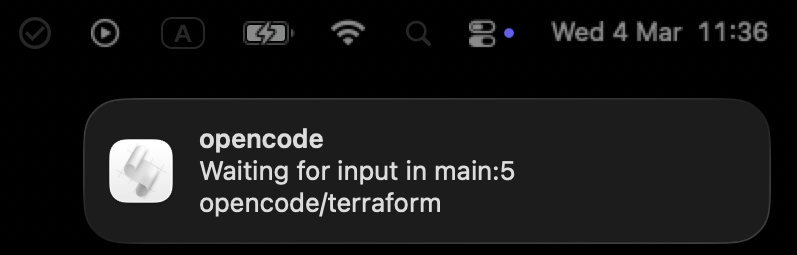
The notification, naming the tmux window, shown only when Alacritty is not the frontmost application.
## How the plugin decides
[OpenCode plugins](https://opencode.ai/docs/plugins) are TypeScript modules in
`~/.config/opencode/plugins/`, run by Bun. A plugin exports an async function
that returns handlers: one generic `event` handler plus named hooks for a few
events. The shell commands below use Bun’s `$`. Everything this plugin does is
a mapping from events to two states: the marker on the window, and whether to
notify:
| Event | Meaning | Effect |
| --- | --- | --- |
| `session.idle` | the agent finished and waits for me | marker on; notify unless the terminal is in front |
| `permission.ask`, `permission.updated` | the agent needs an approval | marker on |
| `session.status` with `busy` | the agent is working again | marker off |
| `chat.message` | I typed something | marker off |
Permission prompts mark the window without a notification because they come
in bursts while I am usually already looking. The shape of the file:
```ts title="~/.config/opencode/plugins/tmux-window-notification.ts"
import { $ } from "bun";
import type { Plugin } from "@opencode-ai/plugin";
const TITLE = "OpenCode";
const OPTION = "@opencode_waiting";
const MARK = "●";
const TERMINAL = /alacritty/i;
export const TmuxWindowNotification: Plugin = async () => {
const pane = (await $`printenv TMUX_PANE`.text()).trim() || null;
const windowId = pane ? await tmuxQuery(pane, "#{window_id}") : null;
return {
event: async ({ event }) => { /* ... below ... */ },
"permission.ask": async () => setWaiting(windowId, true),
"chat.message": async () => setWaiting(windowId, false),
};
};
```
## Pinning the window
`TMUX_PANE` is the pane OpenCode was started in, and the plugin turns it into
a window id once, at load. Without that, an event would go to whichever window
happens to be active when it fires, which is the one window that does not need
a marker:
```ts
const tmuxQuery = async (target: string, format: string) => {
const args = ["display-message", "-p", "-t", target, format];
return (await $`tmux ${args}`.text()).trim();
};
// "work:3 api": session, window index and name for the notification
const windowLabel = (pane: string) =>
tmuxQuery(pane, "#S:#I #{window_name}");
```
## The marker
The marker is a tmux window option, set or unset on the pinned window. The
status line draws it, and tmux clears it when the window is selected. The
plugin remembers the last state, so a burst of events sends one command, not
one per event:
```ts
let waitingState: boolean | null = null;
const setWaiting = async (
windowId: string | null,
waiting: boolean,
) => {
if (!windowId || waitingState === waiting) return;
const args = waiting
? ["-q", "-t", windowId, OPTION, MARK]
: ["-q", "-u", "-t", windowId, OPTION];
try {
await $`tmux set-window-option ${args}`;
waitingState = waiting;
} catch {
// tmux is gone or the window is; nothing to mark
}
};
```
## The notification
macOS notifications go through `osascript`. The frontmost application is
checked first, so a session that finishes while the terminal is already in
front produces a marker and no popup:
```ts
const FRONTMOST = [
'tell application "System Events"',
"to get name of first application process whose frontmost is true",
].join(" ");
const terminalInFront = async () => {
try {
const name = (await $`osascript -e ${FRONTMOST}`.text()).trim();
return TERMINAL.test(name);
} catch {
return false;
}
};
const notify = async (message: string) => {
const script = [
"on run argv",
"set {msg, ttl} to argv",
'display notification msg with title ttl sound name "Pop"',
"end run",
];
const flags = script.flatMap((line) => ["-e", line]);
await $`osascript ${flags} ${message} ${TITLE}`;
};
```
## The event handler
The generic handler carries the mapping from the table. `session.status`
arrives with a status that is a string in some events and an object in others,
which is why the handler unwraps it:
```ts
event: async ({ event }) => {
if (event.type === "session.status") {
const status = event.properties?.status;
const type = typeof status === "object" ? status?.type : status;
if (type === "busy") await setWaiting(windowId, false);
return;
}
if (event.type === "permission.updated") {
await setWaiting(windowId, true);
return;
}
if (event.type !== "session.idle") return;
await setWaiting(windowId, true);
if (await terminalInFront()) return;
const label = pane ? await windowLabel(pane) : null;
await notify(
label ? `Waiting for input in ${label}` : "Waiting for your input",
);
},
```
## The tmux side
The status line shows the marker when the option is set, and three hooks
clear it when the window is selected or the client regains focus:
```text title="~/.tmux.conf"
# the marker, drawn before the window index while the option is set
set -g @waiting '#{?@opencode_waiting,#[fg=colour153]● ,}'
setw -g window-status-current-format ' #{E:@waiting}#I:#W#F '
setw -g window-status-format ' #{E:@waiting}#I:#W#F '
# clear it when the window is selected or the terminal regains focus
set-hook -g after-select-window 'setw -qu @opencode_waiting'
set-hook -g session-window-changed 'setw -qu @opencode_waiting'
set-hook -g client-focus-in 'setw -qu @opencode_waiting'
```
`#{E:@waiting}` expands the option’s value as a format, so the conditional
lives in one place and the two window formats only reference it.
## Limitations
Everything about the notification is macOS: `osascript` for the popup and
for the frontmost check. On Linux the same two calls would be `notify-send`
and a compositor-specific query.
The terminal is a regular expression on the frontmost application’s name,
so a different terminal means editing `TERMINAL`.
`TMUX_PANE` has to be in OpenCode’s environment, which it is when OpenCode
is started from inside tmux. Started elsewhere, the plugin still notifies,
with the generic text, and marks nothing.
The marker belongs to a window, not a session. Two OpenCode sessions in one
window share it, and selecting the window clears it for both.